
Understanding Amazon SageMaker: AWS’s Powerful Machine Learning Platform
Machine Learning (ML) is transforming the way organizations make decisions, automate processes, and deliver intelligent customer experiences. However, building and deploying ML models traditionally requires complex infrastructure, specialized expertise, and continuous monitoring.
This is where Amazon SageMaker comes into play.
Amazon SageMaker is a fully managed machine learning service offered by Amazon Web Services (AWS) that enables developers, data scientists, and businesses to build, train, tune, deploy, and monitor machine learning models at scale — all from a single platform.
Based on the reference content shared , this blog explores SageMaker’s capabilities, deployment options, and why it has become one of the most important AI/ML services in the AWS ecosystem.
What is Amazon SageMaker?
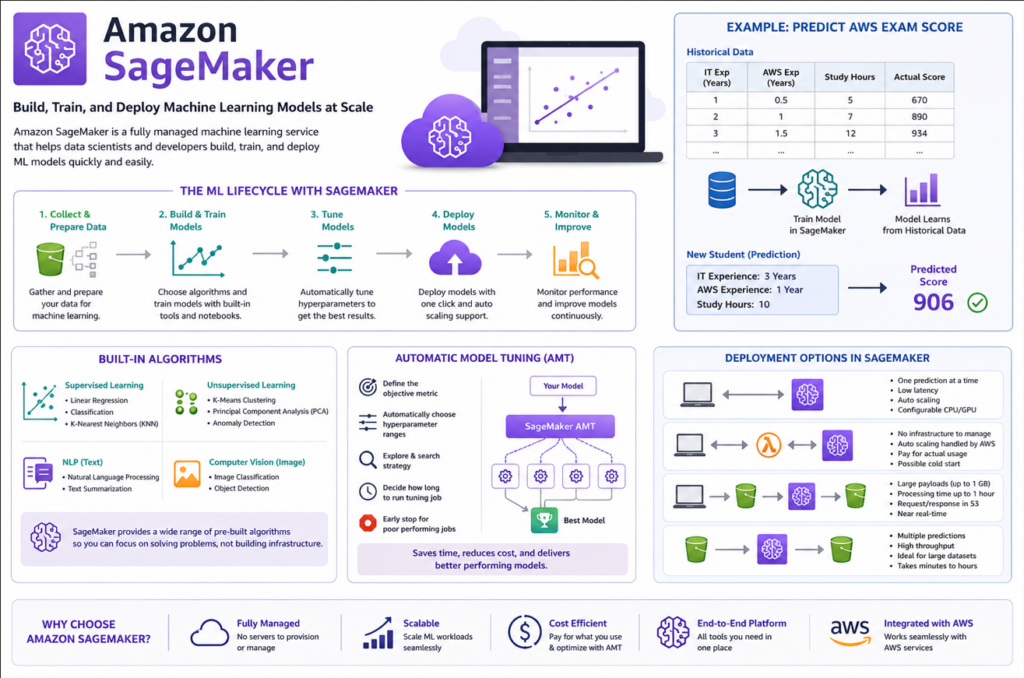
Amazon SageMaker is an end-to-end machine learning platform that simplifies the complete ML lifecycle. Instead of manually setting up servers, configuring frameworks, and managing infrastructure, SageMaker provides everything in one integrated environment.
With SageMaker, users can:
- Collect and prepare data
- Build and train ML models
- Tune model performance
- Deploy models for inference
- Monitor predictions and improve models continuously
The biggest advantage is that AWS manages the heavy lifting of infrastructure, scaling, and operations, allowing teams to focus more on innovation and less on maintenance.
Understanding SageMaker Through a Simple Example
Imagine you want to predict a student’s AWS certification exam score.
You collect historical data such as:
- Years of IT experience
- Years of AWS experience
- Hours spent studying
- Actual exam score
Using SageMaker, this historical data is fed into a machine learning model for training. Once trained, the model can predict the score of a new student based on their experience and preparation time.
For example:
| IT Experience | AWS Experience | Study Hours | Predicted Score |
|---|---|---|---|
| 3 Years | 1 Year | 10 Hours | 906 |
This demonstrates how SageMaker can transform raw data into intelligent predictions.
Key Features of Amazon SageMaker
1. Fully Managed Machine Learning Environment
Traditionally, ML projects require provisioning servers, installing frameworks, configuring GPUs, and managing scaling manually.
SageMaker removes this complexity by offering:
- Managed compute infrastructure
- Built-in ML tools
- Automated workflows
- Scalable training environments
This significantly reduces operational overhead for organizations.
2. Built-in Machine Learning Algorithms
SageMaker includes several pre-built machine learning algorithms that help accelerate development.
Supervised Learning Algorithms
Used for prediction and classification tasks:
- Linear Regression
- Classification Models
- K-Nearest Neighbors (KNN)
Unsupervised Learning Algorithms
Used for identifying patterns in data:
- K-Means Clustering
- Principal Component Analysis (PCA)
- Anomaly Detection
Advanced AI Capabilities
SageMaker also supports:
- Natural Language Processing (NLP)
- Text Summarization
- Image Classification
- Object Detection
These built-in capabilities make SageMaker a powerful one-stop platform for AI and ML workloads.
Automatic Model Tuning (AMT)
One of the most powerful features of SageMaker is Automatic Model Tuning (AMT).
In machine learning, models often require tuning of hyperparameters to improve performance. Traditionally, this process can be time-consuming and expensive.
With AMT, SageMaker automatically:
- Selects hyperparameter ranges
- Runs multiple tuning experiments
- Identifies the best-performing configuration
- Stops poor-performing jobs early
This helps organizations save both time and cloud costs while improving model accuracy.
Deploying Machine Learning Models in SageMaker
Once a model is trained, the next challenge is deployment.
SageMaker makes deployment extremely simple with one-click deployment options and automatic scaling support.
There are four major deployment modes available.
1. Real-Time Inference
Real-time inference is designed for applications that require immediate predictions.
Example Use Cases
- Fraud detection
- Recommendation engines
- Chatbots
- Live scoring systems
Characteristics
- Low latency
- One prediction at a time
- Auto-scaling support
- Configurable CPU/GPU resources
This is ideal for applications where users expect instant responses.
2. Serverless Inference
Serverless inference simplifies deployment even further.
With serverless deployment:
- No infrastructure management is required
- Auto-scaling is fully managed
- You only pay for actual usage
However, serverless endpoints may experience a cold start, where the model takes additional time to initialize after periods of inactivity.
Best Use Cases
- Intermittent workloads
- Low-traffic ML applications
- Cost-sensitive projects
3. Asynchronous Inference
Asynchronous inference is useful for large payloads and long-running predictions.
Characteristics
- Payload size up to 1 GB
- Processing time up to 1 hour
- Request and response stored in Amazon S3
- Near real-time processing
Best Use Cases
- Video processing
- Large document analysis
- AI batch media transformations
This mode is ideal when immediate responses are not required.
4. Batch Transform
Batch Transform is designed for bulk predictions on entire datasets.
Characteristics
- Multiple predictions at once
- High throughput
- Concurrent processing
- Suitable for large datasets
Best Use Cases
- Sales forecasting
- Customer churn prediction
- Monthly analytics processing
Batch processing may take minutes or hours depending on the dataset size.
Comparing SageMaker Deployment Options
| Deployment Type | Latency | Payload Size | Best For |
|---|---|---|---|
| Real-Time Inference | Low | Small | Instant predictions |
| Serverless Inference | Low (with cold start possibility) | Small | Low-traffic applications |
| Asynchronous Inference | Medium | Up to 1 GB | Large single requests |
| Batch Transform | High | Large datasets | Bulk predictions |
This flexibility allows organizations to choose the deployment strategy that best fits their business requirements.
SageMaker Studio: Central Hub for ML Development
Another important component is Amazon SageMaker Studio.
SageMaker Studio provides a unified web-based interface for:
- Data preparation
- Model building
- Debugging
- Team collaboration
- Workflow automation
- Model deployment
It acts as the central workspace for end-to-end machine learning development.
Benefits of Using Amazon SageMaker
Organizations adopt SageMaker because it offers:
Faster ML Development
Pre-built tools and managed infrastructure accelerate project delivery.
Reduced Operational Complexity
No need to manage servers or manually scale infrastructure.
Cost Optimization
Features like automatic scaling and AMT reduce unnecessary cloud spending.
Enterprise Scalability
Supports everything from experimentation to production-grade AI systems.
Integration with AWS Ecosystem
Works seamlessly with services like:
- Amazon S3
- AWS Lambda
- Amazon Redshift
- AWS IAM
- Amazon CloudWatch
Real-World Use Cases of SageMaker
Industries across the globe use SageMaker for:
- Fraud Detection
- Predictive Maintenance
- Recommendation Systems
- Customer Sentiment Analysis
- Healthcare Predictions
- Demand Forecasting
- Image Recognition
- AI Chatbots
Its versatility makes it suitable for startups, enterprises, and research teams alike.
Final Thoughts
Amazon SageMaker has emerged as one of the most comprehensive machine learning platforms in the cloud ecosystem. By simplifying the end-to-end ML lifecycle, it empowers organizations to innovate faster and deploy intelligent applications at scale.
Whether you are a beginner exploring machine learning or an enterprise building large-scale AI solutions, SageMaker provides the flexibility, scalability, and automation needed to succeed in the modern AI-driven world.
As AI adoption continues to grow, platforms like SageMaker will play a crucial role in making machine learning more accessible, efficient, and production-ready.